What this replaces
The work that returns every time the business changes shape.
Every new field is a release
A new document type, one more field, a different nesting — and it turns into a migration, an API change, a UI change and a deploy. The model changes far more often than the release train allows.
The same CRUD, rebuilt again
Each new record type needs endpoints, forms, list views and validation that all say the same thing. The work is not hard, it is just endless, and it scales with the number of things you track.
Integrations nobody can see into
Point-to-point scripts work until one fails quietly. There is no shared place to see what ran, what it returned, what retried, or what is still stuck.
Automation that cannot read your data
A workflow that can only act on the payload that triggered it cannot check stock, confirm a permission, or look up the related record before deciding. Real processes need to ask questions mid-run.
Answering "who changed this, and when"
Compliance and security reviews need an attributable history of both the data and the process. Assembling that after the fact, from logs, is the expensive way to find out you cannot.
Two products, used together or apart
Data governs the record. Automation runs the work around it. Publish a Data model and its record operations become available to Automation; bind the entity, map the fields and arm the workflow without rebuilding a connector.
SynaptaGrid Data
Change the model, not the release plan
Model the records your business actually keeps — then change their shape without a migration.
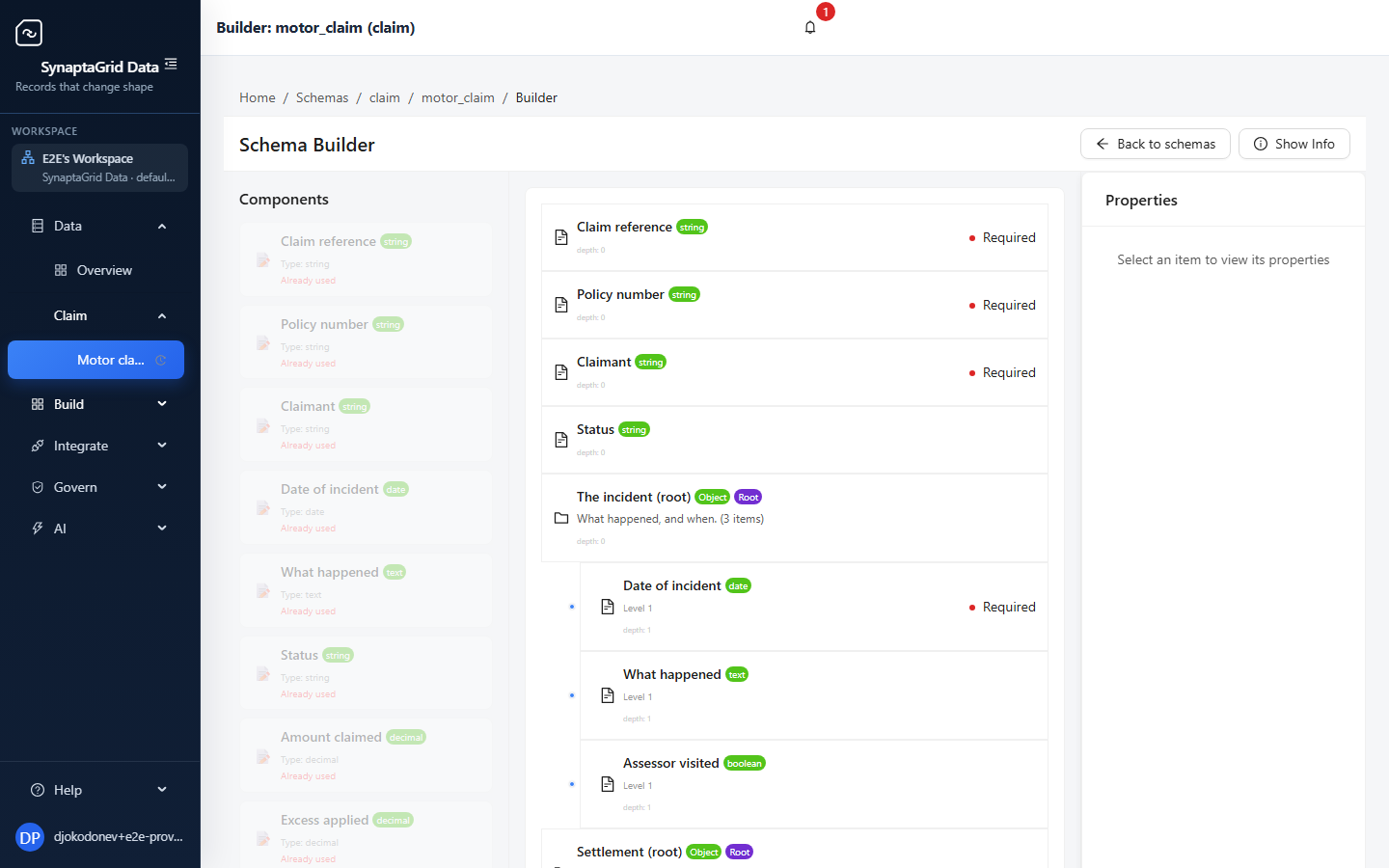
Define record types and reusable field groups, nest and repeat them as deeply as the real document does, and get the endpoints and the screens for free. Every version of the model is kept, every change is attributed, and you can go back. Run it on our cloud or keep the data in your own environment.
23 capabilities
- Model the shape you actually use
- Fields that look right on screen
- Choice lists that stay current
- Build the schema by dragging
- See what a change will break
and 18 more
SynaptaGrid Automation
Run the work, and watch it run
Build a process visually, connect any system that has an API, and see every run that happens.
Chain steps into a workflow with conditional branching and a human decision where one belongs. Any service with an API description becomes a step you can use. Runs retry, resume and keep their history, and operations can pause or throttle a workflow without a deploy.
17 capabilities
- Draw the process, then run it
- It refuses to publish a broken process
- A running process finishes as it started
- Start it however it needs to start
- Stop and ask a person
and 12 more
What you can do with it
Six areas, and every capability underneath them is on the product pages in full.
Modelling
Design the model, not the tables
Nested, repeating structures that match the real document, built by dragging rather than by migration.
- Model the shape you actually use
- Fields that look right on screen
- Choice lists that stay current
- Build the schema by dragging
Change
Change it without a migration
See what a change breaks before you publish it, move the data forward when you do, and go back if you need to.
- See what a change will break
- Managed migration across a breaking change
- Go back to any earlier version
- Publish on a schedule, or on approval
Access
An API and screens on day one
Every record type arrives with its own endpoints, a working interface, search, and a way to get data in and out.
- Its own API the moment you publish
- Screens you did not have to build
- Find records properly
- Start from what you already have
- and 4 more
Process
Run the work, with people in it
Draw the process, decide what triggers it, and stop for a human decision where a human decision belongs.
- Draw the process, then run it
- It refuses to publish a broken process
- A running process finishes as it started
- Start it however it needs to start
- and 3 more
Operations
Watch it, and fix it live
Every run recorded step by step, with the controls to restart, rewind, throttle or pause without a deploy.
- See every run, step by step
- Fix a run without starting over
- A restart does not lose the run
- Turn it down without a deploy
- and 3 more
Integration
Connect what you already run
Any service with an API description becomes usable, and everything that happens here can be pushed back to your systems.
- Any API becomes a step
- Say where each value comes from
- Check the record before deciding
- Wait for a slow system properly
- and 6 more
One run, one path, fully recorded
Steps chain, links carry conditions, and a person can be part of the process without leaving it.
Each link carries a condition. The first one that matches is the path taken — and a rejected approval simply follows a different link.
Describe it, and it gets built
Tell the assistant what you need to track and what should happen to it, and it builds the record types and the workflow for you.
It works inside your account as you, not as a service account — so it can only reach what your own permissions already allow, and every action it takes lands in the same audit trail as if you had clicked it yourself.
Connect your account to your AI client
The platform is a remote MCP server, so an AI client can read your records and run your workflows as you, under your own sign-in.
Who it is for
Teams with data that keeps changing shape
Ship model changes without a migration
Define record types and reusable field groups, nest and repeat them as deeply as the real document does, and change them later without a rebuild. Every version is kept.
Worked example: Regulated lending →Operations teams that own a process
Run and adjust workflows without engineering
Build the process visually, watch every run, and pause, retry or throttle it yourself. Changing a step does not require a deploy.
Worked example: Field service and inspections →Integration-heavy platforms
One place for every connected system
Register a system once by importing its API description, map records to its inputs and outputs, and reuse that connection across every workflow.
Worked example: Laboratory and clinical operations →Regulated and compliance-driven organizations
An attributable history of data and process
Versioned models, run history and an audit trail of who changed what and when — plus roles and permissions, retention, tenant isolation, and the option to keep data in your own environment.
Worked example: Insurance claims →Start with one record type
Model something small, publish it, and see the API and the screens appear. The trial needs no call with us.